
How to use Nidec Automation ROS 2 drivers ---->
ROS 2 (Robot Operating System 2) is an open‑source framework for building robot applications. It provides tools and libraries for communication, sensor integration, and modular software design, enabling reliable, real‑time, and distributed robotics systems across multiple platforms.
Nidec Automation has developed in‑house ROS 2 drivers to enable seamless integration of our drives into customer applications. This simplifies implementation and accelerates deployment across a wide range of robotics systems.
Instructions on how to install our drivers
Create a step-by-step guide
Step 1: Download Ubuntu 24.04
We recommend downloading and using Ubuntu 24.04, since ROS 2 Jazzy Jalisco is designed to work seamlessly on this version of Ubuntu. This provides the most reliable setup when working with our ROS 2 drivers. You can find Ubuntu on the official Canonical website, using the following link: https://ubuntu.com/download/desktop.
Step 2: Install ROS 2 Jazzy Jalisco
To install ROS 2 Jazzy Jalisco, please follow the instructions on the following official installation guide by Open Robotics, the developer of ROS 2: https://docs.ros.org/en/jazzy/Installation/Alternatives/Ubuntu-Development-Setup.html.
Step 3: Create a ROS 2 workspace
To create a ROS 2 workspace, follow the instructions on the official guide by Open Robotics. You can find the instructions on the following link: https://docs.ros.org/en/jazzy/Tutorials/Beginner-Client-Libraries/Creating-A-Workspace/Creating-A-Workspace.html
Steps 1,2,3 can be omitted if you already have ROS 2 Jazzy Jalisco installed and a workspace
Step 4: Install Nidec Automation ROS 2 drivers
1. Use the following link: Nidec Automation ULV drives ROS2 driver to download the latest ROS-Driver_20251224.tar.gz file.
The repository for our ROS driver is organized as below:
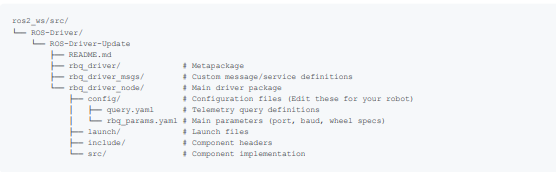
2. Clone this repository into the src directory of your colcon workspace (e.g., ~/ros2_ws/src).
cd ~/ros2_ws/src
Paste the repository files in src and unzip ROS-Driver_20251224.tar.gz within the src directory.
3. Extract the tar.gz file:
tar -zxvf ROS-Driver_20251224.tar.gz
4. Set up your environment by sourcing the following file.
source /opt/ros/jazzy/setup.bash
5. Install dependencies using rosdep
cd ~/ros2_ws
rosdep install --from-paths src --ignore-src -r -y
Note: If you haven't initialized rosdep yet, please run the following commands first:
sudo rosdep init
rosdep update
6. Build the package using colcon
cd ~/ros2_ws
colcon build --symlink-install --packages-up-to rbq_driver
With these steps you should now have our ROS 2 drivers installed. Follow up on Configuration and use guide, for more information on how to configurate and use the drivers.