← 4.2.1 ACIM - Closed Loop - Torque v 1.0
Note: The Guide can be downloaded in PDF format at the end of the article.
Disclaimer and Safety Information
Disclaimer
This quick startup guide is provided as a complementary resource to the official motor drive manual and datasheets. It is not intended to be the sole source of information for proper motor drive configuration and operation. Incorrect configuration or software bugs may cause unintended behavior, including uncontrolled motor operation or runaway. Users must always conduct tests cautiously and ensure they have a reliable method to safely stop the system in such scenarios. Roboteq, the author, and related parties are not liable for any hardware damage, personal injury, or other consequences arising from the use or misuse of the information in this guide.
Safety Symbols Explanation
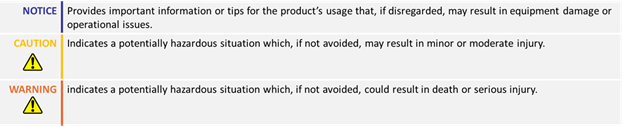
Table of Contents
1. How to Use This Guide
This guide is part of a series of documents that must be followed sequentially to configure and test an AC Induction motor. The process begins with the VpHz configuration and continues through the sequence of documents until reaching the final target operating mode.
For example, configuring a higher-level operating mode, such as FOC Speed, requires completing the configuration and testing of lower-level modes, including VpHz and FOC Torque.
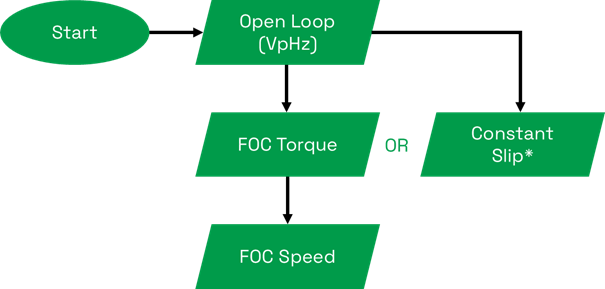
* Constant Slip is a basic speed control method without current regulation and should only be used for simple applications with a constant load.
2. Theory: Cascaded Operation
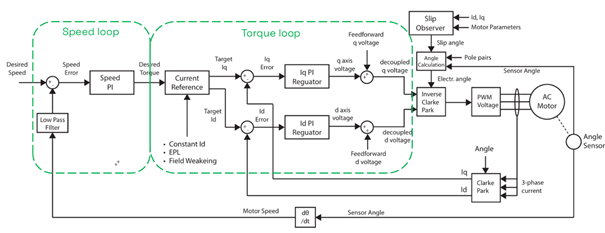
- The motor drive operates using a cascaded control structure, where the Speed and Torque control loops work together to drive the motor to the desired setpoint. The speed loop generates a torque reference, which is then used by the torque loop to supply the appropriate current to the motor.
- Proper configuration and tuning of both Torque and Speed loops is essential for optimal performance.
2. Theory: Field Oriented Control
Field Oriented Control (FOC)
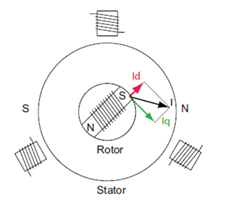
Field Oriented Control (FOC) in induction motors is an advanced method for controlling AC motors by decoupling the stator current into two orthogonal components that separately control the magnetic flux (Id current) and torque (Iq current).
The Id current in an AC induction motor is kept at an optimal value to generate the required rotor flux. This magnetic flux, in combination with the Iq current, generates the required motor torque.
Rotor Angle Estimation
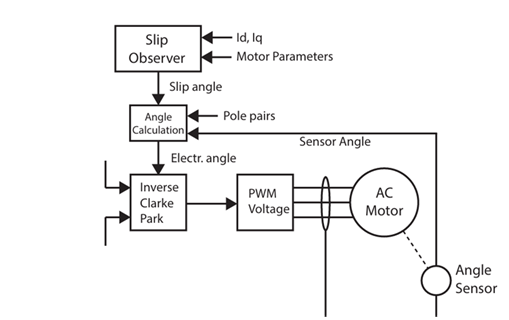
FOC requires knowledge of the rotor's field angle. While induction motors can utilize rotor sensors, these sensors are not absolute, making direct measurement of the rotor's angle impossible. To overcome this challenge, motor control employs an algorithm that estimates the rotor's magnetic field angle using the encoder data, motor model, and motor current measurements.
3. Required Parameters List
- All required parameters should have been set through the V/Hz and FOC Torque configuration guides. This guide will demonstrate how to perform Speed PID tuning for the motor. The only required configuration parameters for the tuning - besides the PID gains, which will be determined experimentally - are the motor acceleration/deceleration and Max Speed, parameters that are derived from the application requirements.

4. Configuration Steps
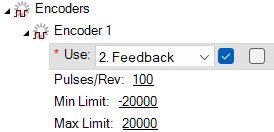
1. Set the Encoder use as Feedback for the Desired Channel.
The sensor’s PPR should have already be configured during the V/Hz configuration.
2. Set the desired motion profile by configuring the Acceleration, Deceleration and Max Speed parameters. Unlike in FOC Torque mode, where acceleration and deceleration determine the rate of change of commanded torque, in FOC Speed mode, acceleration and deceleration correspond to changes in RPM per second. Be aware that high acceleration and deceleration values require increased current. Ensure that these values are set reasonably so that the drive can supply the required current and the motor can handle it without risk.

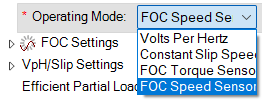
3. Set the operating mode to FOC Speed Sensored:
This is the Closed Loop Speed mode supported fo the AC Induction motor drives.
4. Set some initial values to the Speed PID gains and test the motor without load:
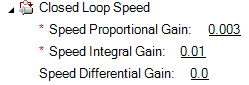
These values should have been initialized through the FOC torque mode configuration, to enable the speed limiting. If this step has been omitted, the Speed Proportional and Integral gains should be initialized here with some small values such as P = 0.003 and I=0.001.
5. For the no load test, navigate to the run tab and run the motor by using the slider.
Ensure that the command is reached in both directions and the speed is stable. It is not required to have a fast response at this point. If the set point is not reached, increase the I gain. Increase the P gain if the motor response is very slow.
5. Tuning: Useful Commands
Loading the motor might result in limitations related to the available space for movement. Two useful tools that can prevent the motor from reaching the space limits are the Watchdog timer and the Console commands.
In contrast to the slider, which sends continuously motor commands to the controller over a specific time period, console commands can be used to send the motor command only once.

Console commands, in combination with the Watchdog timer, can be used to stop the motor after a specific amount of time. The watchdog will stop the motor if the command is not renewed within a defined time period.
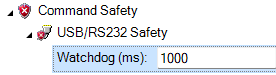
Sending the commands through the console guarantees that the watchdog timer will expire after the configured time.
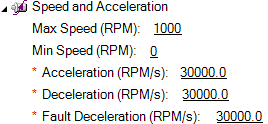
Watchdog timer will stop the motor using the configured Fault Deceleration parameter, so ensure that it has been set with the desired value:

A motor command in Speed Mode can be sent with the following syntax:
!S cc nn
where cc is the channel and nn is the desired speed in RPM.
For example, the following command will give a set point of 300 RPM in channel 1:
!S 1 300
There is also the option to send a simultaneous motor command to both channels by combining the two commands with an underscore (“_”).
For example, the following command will give a desired speed of 500 RPM to both channels:
!S 1 500_!S 2 500
Issuing a motor command for both motors can be useful in dual-channel applications like differential drive AGVs.
5. PID Tuning with Load
At this point Load should be added to the motors to tune them for the actual application conditions.
For the load tuning, follow the next step:
1. Set the Acceleration, Deceleration, and Fault Deceleration values to the maximum (e.g., 30000).
This should be done only for the tuning process to approximate a step response, and the values should be restored to the application-specific settings afterward.
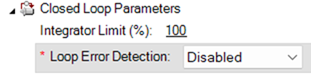
2. Disable Loop Error Detection:
Loop error detection should be disabled during the tuning process and then set to a value according to the application requirements.
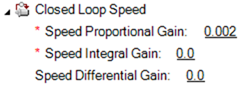
3. Set a small Speed Proportional Gain value in the Closed Loop Speed Gains, such as 0.002
5. PID Tuning
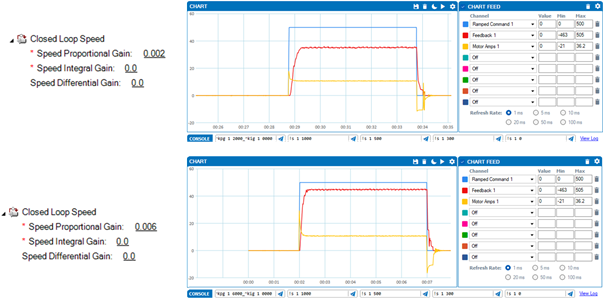
4. Send a small speed command (approximately 10% of the rated speed of the motor) using console commands.
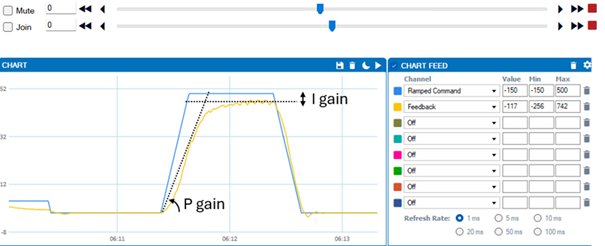
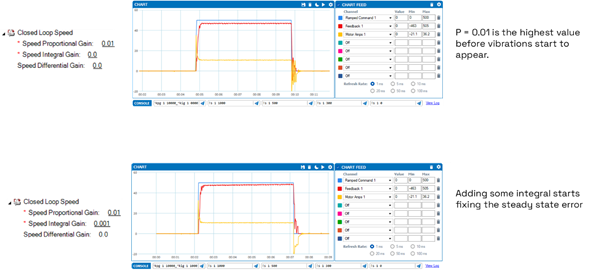
Gradually increase the proportional gain until the feedback moves closer to the ramped command. Retain the highest P value that does not cause oscillations. The increase I gain until the steady state error is minimized.
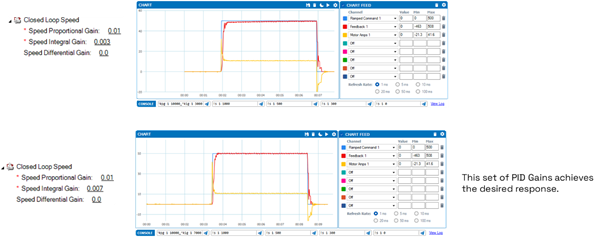
5. Revert to the previous acceleration profile:
Set the initial values for the Acceleration, Deceleration and Dault Deceleration parameters.
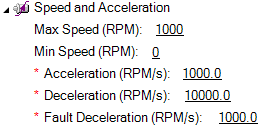
6. Enable Loop Error Detection:
This method is used to detect large tracking errors due to mechanical or sensor failures and shut down the motor in case of problem in closed loop speed or position modes. The detection mechanism checks the size of the tracking error and the time the error is present. Both loop error limit at time parameters are configurable.
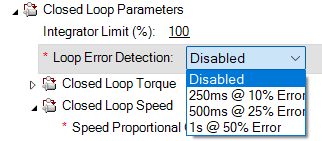
7. Test the motor response at various speeds: "Test the motor response at various speeds: This time, the motor follows the application's acceleration profile. The feedback should closely follow the ramped command.
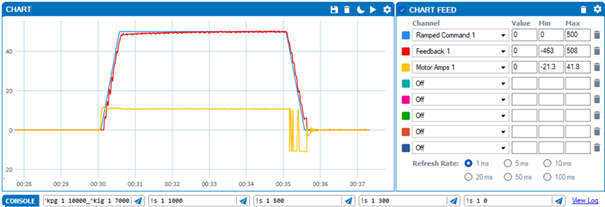
8. Perform any further micro-adjustments:
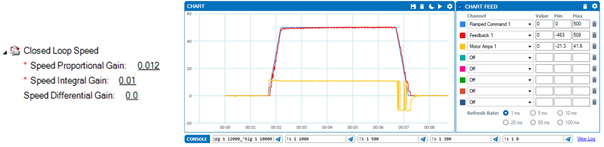
Once the feedback closely follows the ramped command, PID tuning is complete!
6. Troubleshooting
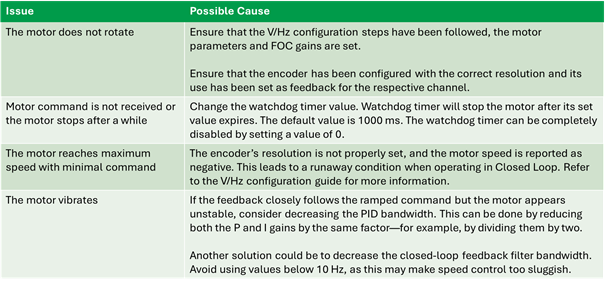
The following table lists some common issues along with their possible causes: