← 4.1.1 ACIM - Open Loop - Volt Per Hertz v1.0
4.2.2 ACIM - Closed Loop - Speed v 1.0 →
Note: The Guide can be downloaded in PDF format at the end of the article.
Disclaimer and Safety Information
Disclaimer
This quick startup guide is provided as a complementary resource to the official motor drive manual and datasheets. It is not intended to be the sole source of information for proper motor drive configuration and operation. Incorrect configuration or software bugs may cause unintended behavior, including uncontrolled motor operation or runaway. Users must always conduct tests cautiously and ensure they have a reliable method to safely stop the system in such scenarios. Roboteq, the author, and related parties are not liable for any hardware damage, personal injury, or other consequences arising from the use or misuse of the information in this guide.
Safety Symbols Explanation
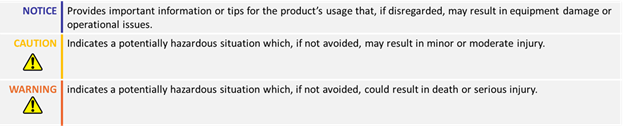
Table of Contents
1. How to Use This Guide
This guide is part of a series of documents that must be followed sequentially to configure and test an AC Induction motor. The process begins with the VpHz configuration and continues through the sequence of documents until reaching the final target operating mode.
For example, configuring a higher-level operating mode, such as FOC Speed, requires completing the configuration and testing of lower-level modes, including VpHz and FOC Torque.

* Constant Slip is a basic speed control method without current regulation and should only be used for simple applications with a constant load.
2. Theory: Cascaded Operation
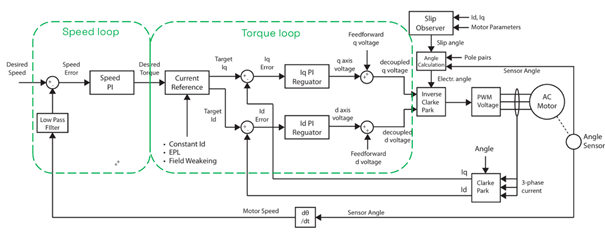
- The motor drive operates using a cascaded control structure, where the Speed and Torque control loops work together to drive the motor to the desired setpoint. The speed loop generates a torque reference, which is then used by the torque loop to supply the appropriate current to the motor.
- Proper configuration and tuning of both Torque and Speed loops is essential for optimal performance.
2. Theory: Field Oriented Control
Field Oriented Control (FOC)
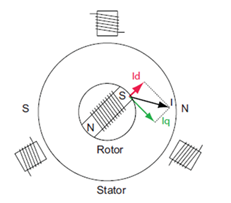
Field Oriented Control (FOC) in induction motors is an advanced method for controlling AC motors by decoupling the stator current into two orthogonal components that separately control the magnetic flux (Id current) and torque (Iq current).
The Id current in an AC induction motor is kept at an optimal value to generate the required rotor flux. This magnetic flux, in combination with the Iq current, generates the required motor torque.
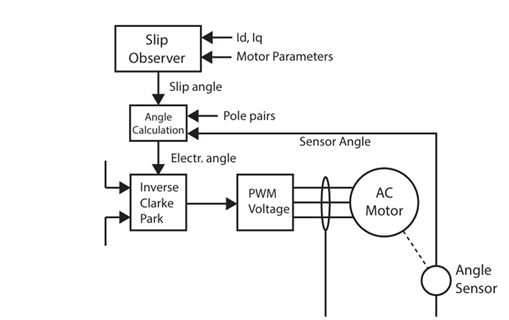
Rotor Angle Estimation
FOC requires knowledge of the rotor's field angle. While induction motors can utilize rotor sensors, these sensors are not absolute, making direct measurement of the rotor's angle impossible. To overcome this challenge, motor control employs an algorithm that estimates the rotor's magnetic field angle using the encoder data, motor model, and motor current measurements.
2. Theory: Current Control Methods
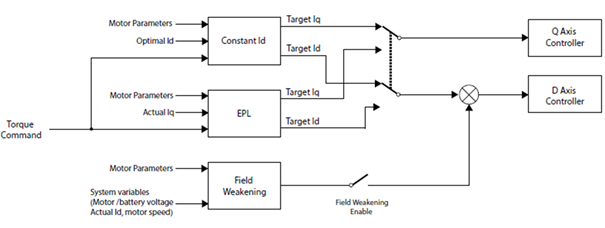
In FOC mode, the target values for the Iq and Id currents are derived from the desired torque using the motor’s torque equation and following one of the three supported control strategies:
- Constant Id
- Efficient Partial Load (EPL)
- Field Weakening
Each function optimizes the motor’s performance by selecting the appropriate values for the Id and Iq currents, ensuring efficient and effective control. Field Weakening can operate in conjunction with either Constant Id or EPL modes.
2. Theory: Current Control Methods
Constant Id
Maintains the Id current at a user-configurable value throughout the entire operation of the motor. The Iq current is then adjusted to achieve the desired torque value. This mode is ideal when the motor operates near its rated load conditions.

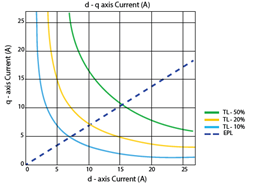
Efficient Partial load
This method is more effective under light load conditions as it works by minimizing copper losses, which become significant when the motor’s load is small. The EPL algorithm achieves this minimization by selecting appropriate values for the Id and Iq currents for the required torque. This mode is not optimal for applications with sudden torque load variations, as the motor's response may be slower than required.
Field Weakening
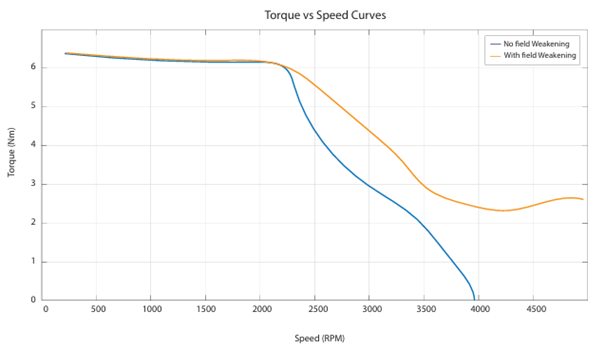
Field weakening in induction motors is a technique used to extend the motor’s speed range beyond its base speed. It is enabled by the configuration and starts to activate when the required motor voltage to achieve the target speed and load exceeds the maximum allowed motor stator voltage. In this mode, the motor speed is increased by reducing the rotor’s flux, which consequently decreases the d-axis current.
2. Theory: Decoupling Control
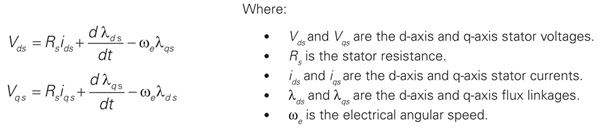
- The d- and q-axis magnetic flux components in AC induction motors are cross-coupled. In simple terms, this means that controlling the q-axis current (which influences torque) also affects the d-axis current (which influences flux), and vice versa:
- To address this, the motor drive employs a decoupling control strategy that compensates for the cross-coupling effect, enabling independent control of torque and flux.
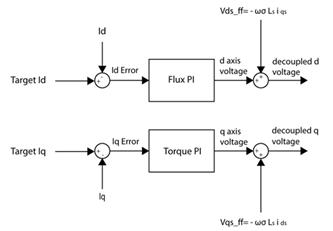
- This decoupling control is automatically enabled once all motor parameters and the PI gains for both the FOC torque and flux controllers are configured.
3. Required Parameters List
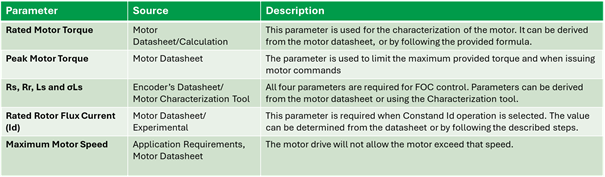
- To complete the configuration sequence, ensure you have the following specifications readily available:
4. Configuration Steps
1. Set the motor’s Torque values:
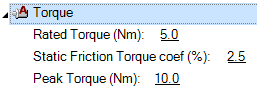
- Rated Torque and Static Friction Coefficient parameters are used by the motor characterization tool, to calculate the motor’s model parameters. If the Static friction coefficient is unknown, it can be left at the default value and fine-tuned during the characterizations process. More information can be found in the Roborun+ utility.
- The Peak Torque value should be properly configured to define the maximum motor torque limit. This parameter is also used when issuing a torque command with the G command, where the command value is one-thousandth of the peak torque.
2. Enter all motor parameters:
The parameter can be set either by running the motor characterization tool through the Setup Wizard or referring to the motor datasheet. All four parameters must be set: Rs, Rr, Ls and σLs, otherwise the drive will trigger a Sensor Error.
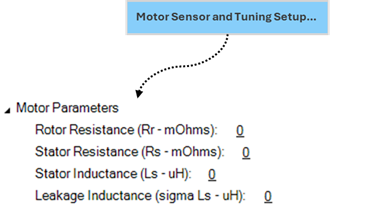
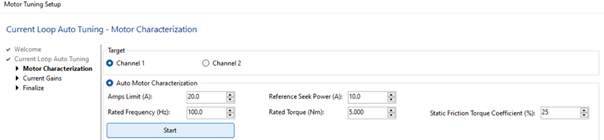
- Entering Motor Parameters through the Setup Wizard:
In the Motor Characterization Section, set the following parameters and click ‘Start’:
- Amps Limit: As set in V/Hz guide
- Rated Frequency: As set in the V/Hz guide
- Rated Torque: Can be obtained from the motor’s label or datasheet. In case is not provided, it can be calculated as follows:
 ,
,
where P is the output power in Watts and n is the motor’s nominal speed in RPM
- Static Friction: Can be left default if unknown
- Reference Seek Power: Set it equal to the Nominal Current of your Motor.

- Manual Entry
In motor characterization tool of the motor configuration wizard, select the ‘Manual Entry’ option and manually set the four parameters. After the parameters are set, a current control bandwidth can be selected.
The motor parameters can be obtained from the motor datasheet or by contacting the motor manufacturer.
In case the σLs (sigma Ls) parameter is not listed in the datasheet, it can be calculated as follows:
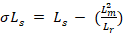 or approximated as:

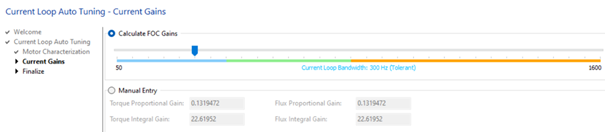
3. Set the FOC Bandwidth:
The Bandwidth can be set through slider or manually by setting the FOC Torque gains. A bandwidth around 200 Hz is recommended as it offers a balanced trade-off between response speed and stability.
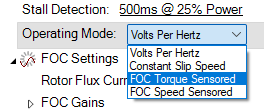
4. Set the Operating mode to FOC torque mode.
5. Select the current reference mode:
- Constant Id: To enable this mode, set the ‘Rotor Flux Current’ parameter. Constant Id mode will be enabled in all FOC modes, if EPL is disabled.

The rated flux current (Id) is usually provided in the motor’s datasheet. Alternatively, it can be determined by running the motor in open-loop V/Hz mode without a load, with the V/Hz parameter properly configured according to motor datasheet. Without a load, the motor’s slip will be almost zero, and the motor’s current will be entirely on the d-axis and equal to the rated flux current.
- EPL: EPL can be enabled through the VpHz/Slip settings. If enabled, it will override any Rotor Flux Current setting.

- Field weakening (Optional): It can be enabled in combination with the Constant Id or EPL modes. To enable Field weakening, set the field weakening ratio to a value below 100%. This value defines the maximum voltage ratio that the field weakening is enabled. Suggested values are from 90 to 97%. To disable it, set it again at 100%.


6. Set the desired motion profile: Max Speed, Acceleration/Deceleration and some initial PID gains:
- In torque mode, the acceleration and deceleration parameters set the ramp for the current command. The units are Nm/sec. Lower acceleration and deceleration values will limit the current response, while higher values will make it more aggressive.
- The motor control algorithms will limit the motor speed to the Max Speed value by using the Closed Loop Speed PID gains.
- To enable the speed limitation, some initial values should have been set. You can start by setting a small value such as 0.03 or 0.1 for both Speed proportional and integral gains and further tune them during the FOC speed mode configuration,

7. Navigate to the run tab and test the motor:
- Give a motor command from the slider or by using the !G serial command.
- The !G command, will request a torque up to the maximum configured motor torque value, scaled from 0 to 1000. For example !G 1 500, will request the 50% of the maximum configured torque from channel 1.
- Be aware that if the motor is unloaded, it may not be able to achieve the desired torque and may run to the maximum speed. The drive will limit the motor speed to the maximum speed parameter.
- Put some load on the motor and ensure the following:
- Feedback is following the Ramped command
- Speed is effectively limited to the max speed parameter
- If the Feedback follows the Ramped command in a fast and stable manner, the Torque Loop is properly tuned! The motor is ready to be configured in FOC Speed Sensored Control.
5. Troubleshooting
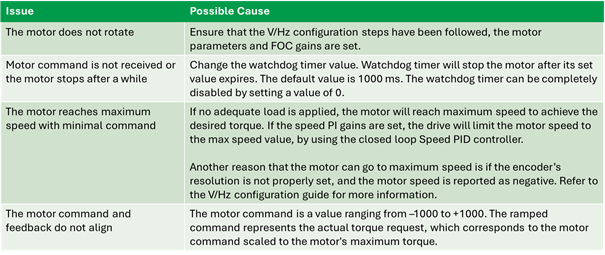
The following table lists some common issues along with their possible causes: