
4.2.1 ACIM - Closed Loop - Torque v 1.0 →
Note: The Guide can be downloaded in PDF format at the end of the article.
Disclaimer and Safety Information
Disclaimer
This quick startup guide is provided as a complementary resource to the official motor drive manual and datasheets. It is not intended to be the sole source of information for proper motor drive configuration and operation. Incorrect configuration or software bugs may cause unintended behavior, including uncontrolled motor operation or runaway. Users must always conduct tests cautiously and ensure they have a reliable method to safely stop the system in such scenarios. Roboteq, the author, and related parties are not liable for any hardware damage, personal injury, or other consequences arising from the use or misuse of the information in this guide.
Safety Symbols Explanation
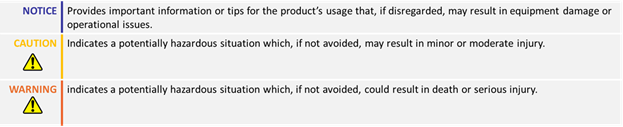
Table of Contents
- How to Use This Guide
- Theory
- Hardware Connections
- Required Parameters List
- Configuration Steps
- Troubleshooting
1. How to Use This Guide
This guide is part of a series of documents that must be followed sequentially to configure and test an AC Induction motor. The process begins with the VpHz configuration and continues through the sequence of documents until reaching the final target operating mode.
For example, configuring a higher-level operating mode, such as FOC Speed, requires completing the configuration and testing of lower-level modes, including VpHz and FOC Torque.
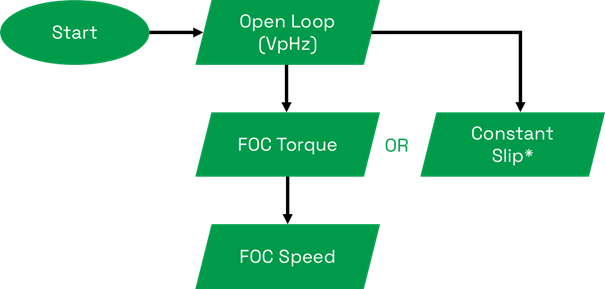
* Constant Slip is a basic speed control method without current regulation and should only be used for simple applications with a constant load.
2. Theory: Volts per Hertz Operation
- Volts per Hertz is an Open Loop mode and the simplest method for driving an AC Induction motor. In this mode, the drive outputs a three-phase sinusoidal PWM voltage with varying frequency and amplitude. Since it is an Open Loop mode, motor speed cannot be directly controlled.
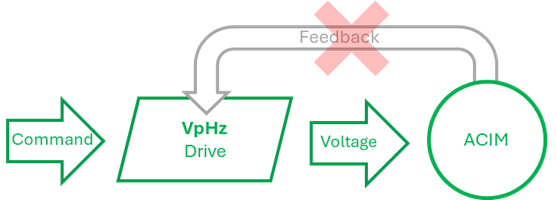
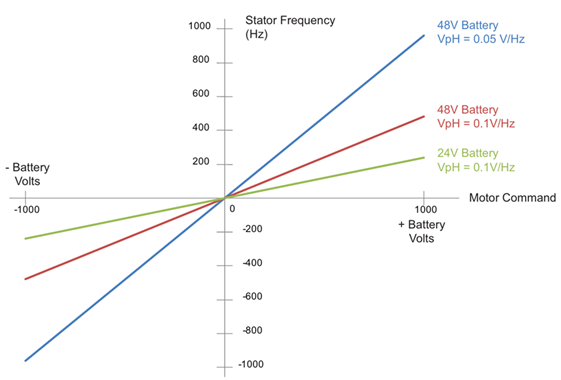
- The amplitude and frequency of the supplied voltage will change at a fixed ratio, in relation to the motor command. This ratio is defined by the VpHz parameter.
- Although it is not the optimal operating mode for running an AC Induction motor due to the lack of current control and feedback, configuring and testing this mode is an essential step before proceeding to more advanced modes, such as FOC Torque or FOC Speed.
3. Hardware Connections
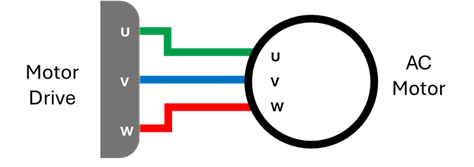
- The motor phases can be connected in any sequence.
- Swapping any two of the three motor phases will reverse the direction of rotation.
- The rotation direction can also be reversed through the drive’s configuration.
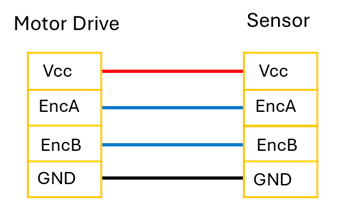
- In most AC Induction motor drives the Encoder signals are connected to the dedicated Molex connector.
- Refer to each motor drive’s datasheet for the specific pinout information
- The Incremental Encoder uses 2 wires for the A,B sensor signals and two wires for its power supply.
- The sensor is powered from the 5V output and the GND of the dedicated sensor connector.

4. Required Parameters List
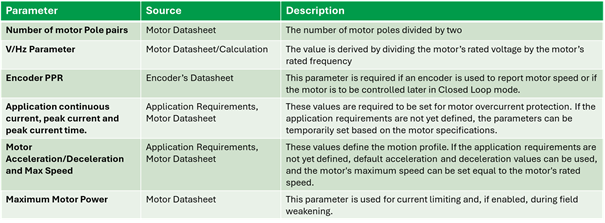
- To complete the configuration sequence, ensure you have the following specifications readily available:
5. Configuration Steps
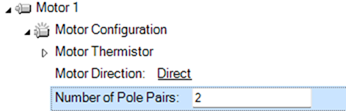
1. Configure the number of pole pairs of the induction motor:
This is the number of pole pairs divided by 2. The parameter is essential for the speed calculation.
2. Configure the Operation mode as Volts per Hertz:
Volts per Herz is an Open Loop mode and is the simplest operating mode. However, it is a prerequisite to proceed to next more advanced operating modes such as FOC Torque, FOC speed and Constant Slip

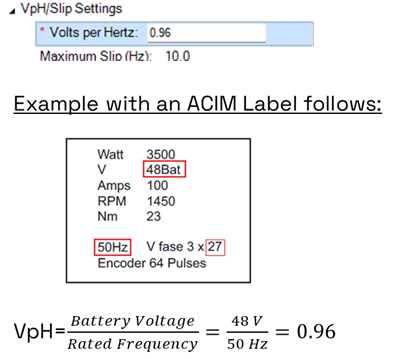
3. On the VpH/Slip Settings configure the Volt per Hertz Value:
This value is determined by dividing the DC Battery voltage of the motor with the rated frequency of the motor.
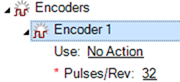
4. Configure Encoder Pulses per Revolution:
The value should be configured according to the encoder’s datasheet. This configuration is essential for reading the correct speed value of your motor. Do not set yet the action as feedback, since feedback is used only in Closed Loop Speed modes (such as Closed Loop speed and Constant slip Operating Mode.)
5. Configure the Amp limit parameter:
The controller will prevent the motor current from exceeding the amp limit parameter by reducing the motor voltage. Please note that although this is a sufficient process, it does not act immediately so it cannot prevent any current spikes. This value should be set equal to the peak current of the motor.
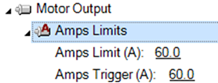
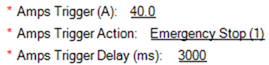
Since the peak current of a motor is typically allowed to be provided only for some time, Roboteq controller offers the option to trigger an action if the motor current exceeds a value for a specific amount of time. This can be configured by the Amps Trigger parameter.
6. Enable the I2T protection:
I2T protection is a method that measures the energy supplied to the motor in order to protect it from overheating. It works by integrating the excessive current supplied to the motor and comparing it with the a threshold value. If the accumulator exceeds the I2T threshold, the drive will stop limiting the current at Amps Limits value and start limiting the current at 80% of the nominal current, allowing the motor to cool down and causing the I²T accumulator to decrease accordingly.
The formulas used are the following:


Where Inow is the instantaneous current, Inom the nominal current of the motor, Ipeak the peak current set through Amps limit parameter and Inom the nominal current of the motor.
To enable the protection, configure the I2T time, which is the time that the motor can handle its maximum current, and Nominal current, which is the nominal current of the motor.

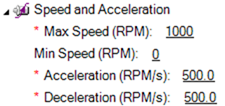
7. Configure the desirable Acceleration and Deceleration and Max Speed:
Since VpHz is an open-loop mode, the motor speed is not directly controlled. However, acceleration and deceleration can be approximated by adjusting the PWM power and considering the maximum RPM setting, which represents the motor speed when 100% of the PWM voltage is applied. For example, if the Max RPM is set to 1000, an acceleration value of 1000 means the motor will reach full speed in 1 second, regardless of the actual speed.
- Note that this value is an estimation and may vary depending on the applied load.
- Choose low acceleration and deceleration values for the first run. (For example 500 rpm/s).
8. Set the Maximum Motor Power parameter:
This parameter is used for limiting the motor current and in field weakening operation, if enabled. The parameter should be set according to the datasheet. If it is not directly provided in the datasheet, it can be derived from the motor’s torque-speed curve by multiplying the maximum torque with the maximum speed at the maximum power point.

9. Test the motor in Run Tab:
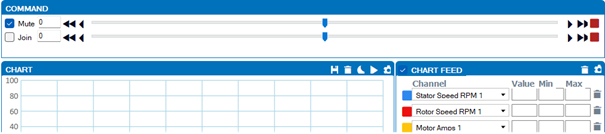
Give a motor command using the slider and verify the following:
- By running the motor in both directions, verify that motor amps have a reasonable value and are kept stable when the motor command is constant. The motor current may increase slightly by increasing the motor command.
- Verify if the rated speed is reached when no load is applied and the motor command is 1000. Achieving rated speed will indicate that the VpHz parameter is set correctly.
- Verify that the Rotor Speed RPM is reported as positive by giving a positive motor command. If not, invert the sign of the encoder Pulses per revolution, to fix that (e.g. from 32 to -32).

If all the steps have been passed, then the Volt per Hertz configuration is effective, and the motor is ready to be configured in FOC Speed Contro, Constant Slip Speed and FOC Torque Mode!
6. Troubleshooting
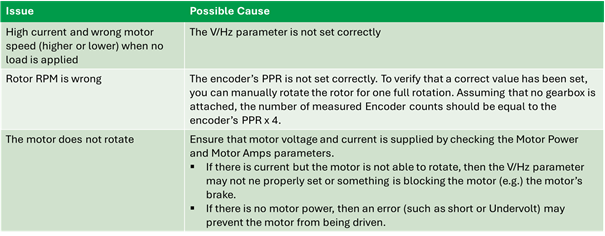
Configuration of Volts/Hz mode should a straightforward process. The most important parameter for its operation is the V/Hz parameter. Ensure that this value is properly set by dividing the Motor’s rated voltage (and not phase voltage) by the rated frequency.
Some common issues and possible causes follow:
4.2.1 ACIM - Closed Loop - Torque v 1.0 →