
← 3.2.2 DC- Closed Loop - Speed v 1.0
Note: The Guide can be downloaded in PDF format at the end of the article.
Disclaimer and Safety Information
Disclaimer
This quick startup guide is provided as a complementary resource to the official motor drive manual and datasheets. It is not intended to be the sole source of information for proper motor drive configuration and operation. Incorrect configuration or software bugs may cause unintended behavior, including uncontrolled motor operation or runaway. Users must always conduct tests cautiously and ensure they have a reliable method to safely stop the system in such scenarios. Roboteq, the author, and related parties are not liable for any hardware damage, personal injury, or other consequences arising from the use or misuse of the information in this guide.
Safety Symbols Explanation
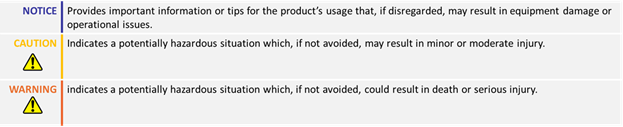
Table of Contents
- How to Use This Guide
- Theory
- Required Parameters List
- Configuration Steps
- Closed Loop Count Position Tuning
- Velocity Feedforward Tuning
- Troubleshooting
1. How to Use This Guide
- This guide is part of a series of documents that must be followed sequentially to configure and test a Brushless DC motor. The process begins with the Open Loop configuration and continues through the sequence of documents until reaching the final target operating mode.
- For example, configuring a higher-level operating mode, such as Count Position with Hall sensors, requires completing the configuration and testing of lower-level modes, including Open, Torque and Speed modes.

2. Theory: Count Position Operation
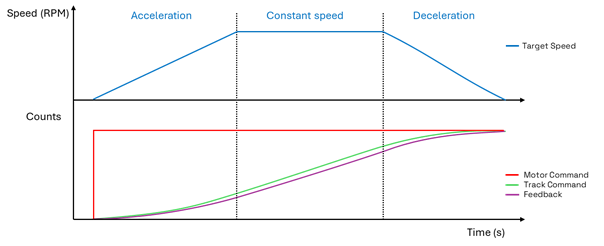
- In the Closed Loop Count Position mode, the drive will move the motor precisely for the desired number of counts, using a predefined acceleration, constant velocity, and deceleration.
- Upon receiving the user command, the pre-defined trajectory is applied, resulting in a smooth and controlled motion.
2. Theory: Motor Command and Feedback
- The Motor Command is the desired number of encoder sensor counts that the motor should move. The Position command can be received from various supported communication modes, such as USB, RS232, RS485, Ethernet, Modbus, CANbus etc.
- The supported Feedback sensors are Quadrature encoders and SSI sensors
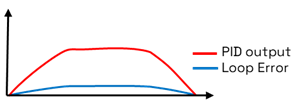
- The motor control uses a PID loop to drive the motor to the desired position

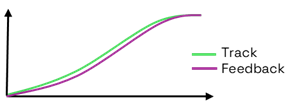
- The Loop Error in Count Position mode is the difference between the Trajectory and the Feedback.
- Sensors having higher resolution will generate a larger Loop Error which in turn will result in a greater amount of motor power in the output of the Position mode PID.
2. Theory: Cascaded Operation
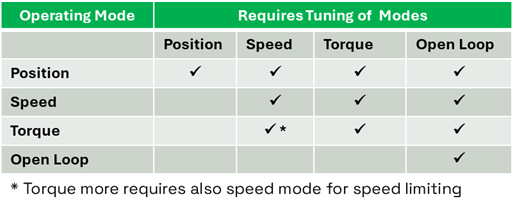
- The motor drive uses a cascaded control structure: the Position Loop controls the Speed Loop, which controls the Torque Loop, ensuring stable motor control.
- Tuning Position mode requires both Speed and Torque loops to be tuned, while Speed mode needs only the Torque loop. Torque and Open Loop modes operate independently.

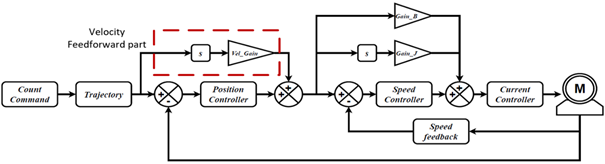
2. Theory: Velocity Feedforward control
- Velocity Feedforward control is an additional feedforward loop taking part in Position mode.
- In contrast to the Acceleration Feedforward control that acts in Speed Loop only during the acceleration of the motor, the Velocity Feedforward control acts every whenever there is a change in the trajectory and a resulting motor movement.
- The motor drive operates by multiplying the motor's desired velocity by the velocity feedforward gain. The higher the velocity, the more feedforward power will be applied to the motor. The velocity feedforward power is added to the power output of the Position mode PID, so this mode operates in parallel with the position mode PID.
3. Required Parameters List
To complete the configuration sequence, ensure you have the following specifications readily available:

4. Configuration steps
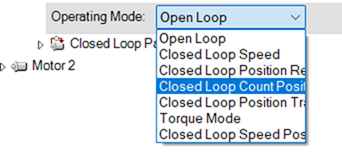
1. Set the operating mode to ‘Closed Loop Count Position’
Closed-Loop Count Position mode uses a predefined acceleration, constant velocity, and deceleration to move the motor for the desired number of counts.
2. Configure the feedback sensor
The feedback sensor should have already been configured during Speed mode tuning. The encoder's or SSI sensor's resolution, channel, and usage should have been set, and the sensor readings should have been evaluated in Open Loop and Closed Loop Speed.

Warning | Failure to configure the feedback sensor according to the instructions provided in the previous guides may result in unintended and potentially hazardous motor behavior, such as uncontrolled movement. |
3. Configure the Closed Loop Error Detection
This parameter is used to detect large tracking errors due to mechanical or sensor failures and shut down the motor in case of problem in closed loop speed or position modes. The detection mechanism checks the size of the tracking error and the time the error is present. Both loop error limit and time parameters are configurable.
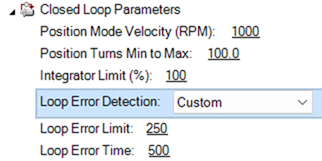
Note | The Loop Error Detection may need to be temporarily disabled during the tuning of the motor, where the optimal response may not be yet achieved. |
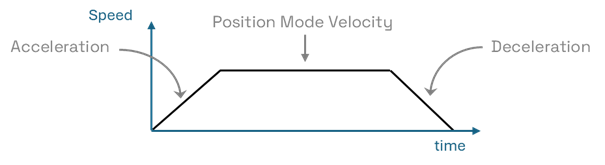
4. Set the desired motion profile by configuring the acceleration, deceleration and position mode velocity parameters.
The motor will move to the desired position following a trapezoidal acceleration, speed, and deceleration profile. How closely this profile is followed is determined by the PID gains. Note that higher acceleration and deceleration values will require more current for the movements.

5. Set a starting value for the position proportional gain and start the tuning.
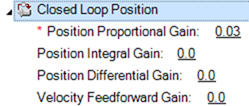
Position mode is primarily tuned using proportional gain. A small value, such as 0.03, can be tested initially. Increase the gain until the feedback matches the track command. Integral gain may reduce the final position error but can also cause overshoots. Test with a small amount of integral gain.
The motor command is sent with the !P cc nn and !PR cc nn commands
Example
- !P 1 5000 will move the motor of channel 1 to the absolute position of 5000 counts

- !PR 2 -500 will move the motor of channel 2, 500 counts away from the motor’s current position, in negative direction.

Warning:
Before testing closed-loop Position, Open Loop and Speed modes must be configured, and the sensor must be set correctly so that the reported speed is positive when a positive command is given. If the sensor is not set properly, the motor may enter a dangerous runaway condition. Ensure you have followed the respective guides.
5. Closed Loop Count Position Tuning
- Next screenshots illustrate the motor response by using different sets of PI gains.
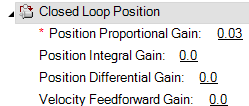
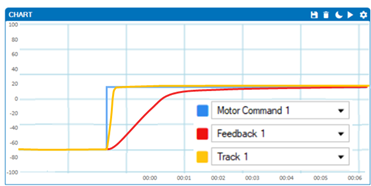
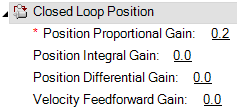
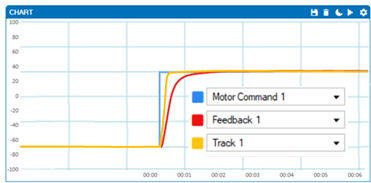
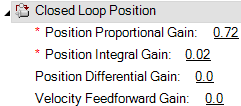
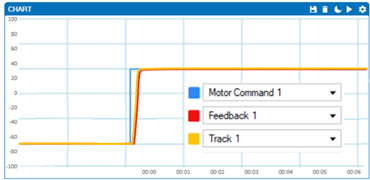
A small value of I gain has been used to ensure that an additional amount of power will be developed, so the motor accurately reaches the target position.
6. Velocity Feedforward Tuning
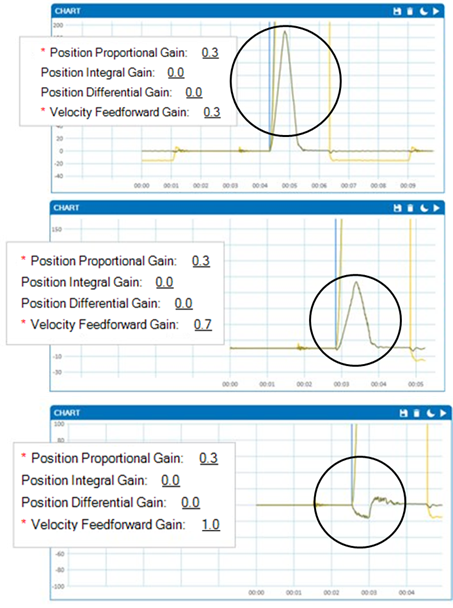
6. Add Velocity Feedforward Gain.
- The Velocity Feedforward control can be enabled by adding a non-zero value to the Velocity Feedforward gain.
- Start by setting a small value, such as 0.1
- Increase the gain until the desired response is achieved
- An easy way to determine the responsiveness of the position mode is by monitoring the Loop Error.
- Increase the Velocity Feedforward gain, until the loop Error is minimized.
- A negative Loop Error indicates that the motor position is being updated faster than the desired trajectory
- Select a value that results in the minimum positive or negative loop error.
- In this example, the value of feedforward gain that will be retained is 1
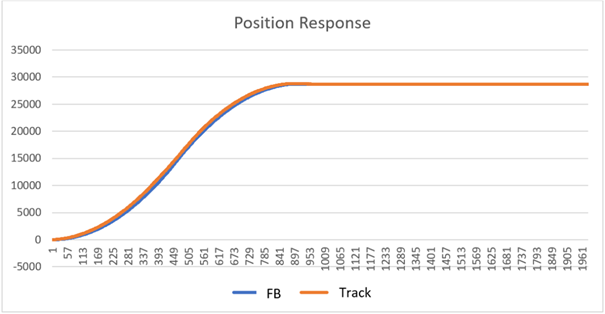
- By plotting the Track and Feedback data that can be recorded from the Run tab, we can assess the position response. In a well-tuned system, the feedback values should closely follow the track command, as illustrated in the following figure:
7. Troubleshooting
Count Position mode operation should be an easy and straightforward process. If the motor does not behave as expected, consider checking the following general points:
- Test the Position command and Feedback
- Send the !P command along with the desired position to the Run Tab and verify that the feedback follows the track without delays and performs as expected.
- Ensure that Torque and Speed modes are properly configured and tuned.
- The motor drive uses a cascaded control operation, where control modes are interdependent. Poor configuration of Torque or Speed modes can affect Position mode.
- PI Tuning
- Large amounts of P gain can cause vibrations.
- If the proportional gain cannot be increased more, because it creates vibrations, but still the desired performance is not achieved, consider modifying Speed or Torque mode configuration. Decrease the speed feedback filter cutoff frequency or decrease the torque mode bandwidth.
- If the motor cannot reach the setpoint using only P gain, a small amount of I gain can be tested.
- Motor Runaway
- This could be due to misconfiguration of the sensor (feedback increases in the opposite direction).
- Slow response
- The motor will follow the trajectory based on the PID settings. Achieving a faster response will require more current for the movement. However, if the current reaches the amp limit parameter, the response time cannot be further improved. Similarly, if the motor power reaches 100% (+- 1000 of Motor power parameter)
- The desired trajectory of the motor is represented by the Track Command parameter. The motor feedback should closely follow this value. If the trajectory is slow, consider increasing the motor Acceleration, Deceleration and Position Velocity parameters.
- Motor Does not Start:
- Verify that the sensor is properly configured for feedback ∙ Perform an emergency stop and manually rotate the shaft, ensuring that the feedback value changes ∙ Monitor the chart to confirm that the motor command is received ∙ Ensure that there is not conflict between watchdog timer and motor command ∙ Check the Run tab for any error flags ∙ Ensure that the motor brake is disengaged or the motor is not jammed